Introduction
A block-editor web app for essence built using blockly
Please note that the aim of this documentation is to provide understanding of each blocks’ functionality. For knowledge on the conjure language, please see Conjure’s documentation here
Program
This section contains blocks that define the domains of parameters and decision variables. These blocks are vital in structuring constraint programs.
Find Statement
This block is used to declare decision variables. It must be nested in a find block. This block can also be extended
so that it can store a list of decision variables.
For example, it can be used like this:
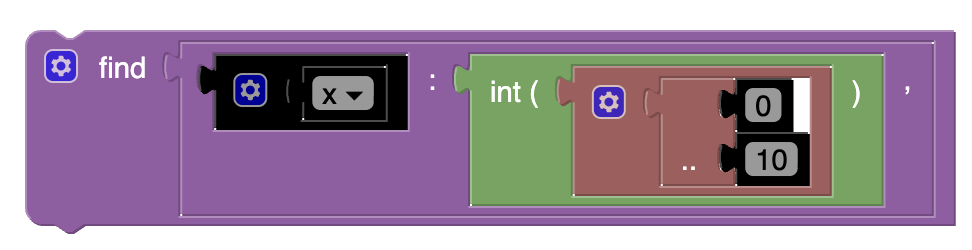
Which would produce the following Essence Output:
find x : int ( 0 .. 10 )
Given Statement
Used to declare a parameter and its domain. This block can also be extended to a list.
For example, it can be used like this:
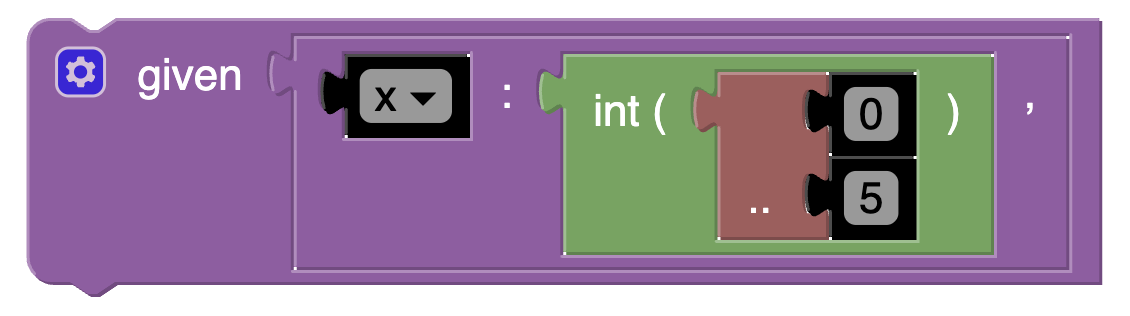
Which would produce the following Essence Output:
given x : int ( 0 .. 5 ) ,
Letting Statement
Assigns a variable to some domain. Can be extended to a list.
For example, it can be used like this:
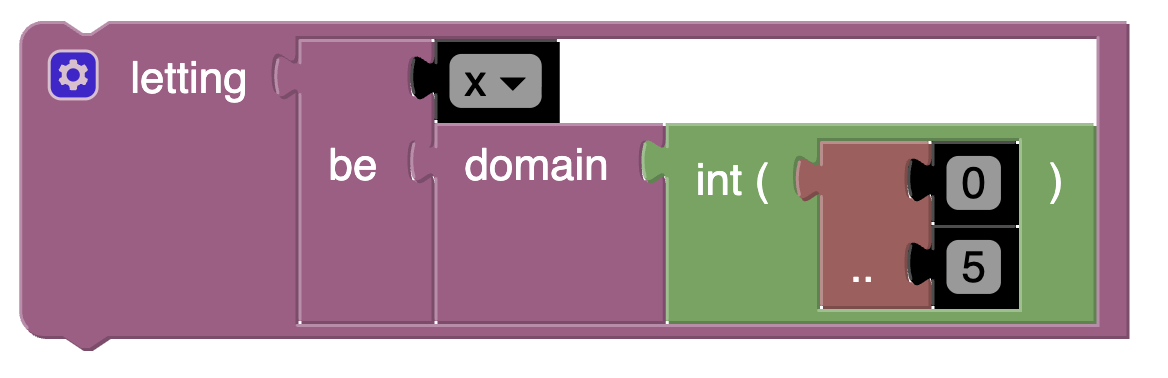
Which would produce the following Essence Output:
letting x be domain int ( 0 .. 5 )
Objective Statement
You can make an objective statement by either using the keyword minimising or the keyword maximising followed by an integer expression. A problem can have at most one objective statement.
Minimising
One of two keywords that can make an objective statement. Tells conjure to find the smallest solution.
This block is typically followed by an integer expression.
Note that a problem specification can have at most one objective statement.
Maximising
One of two keywords that can make an objective statement. Tells conjure to find the largest solution.
This block is typically followed by an integer expression.
Note that a problem specification can have at most one objective statement.
Such that Statement
Used to define constraints. Can be extended to a list.
For example, it can be used like this:
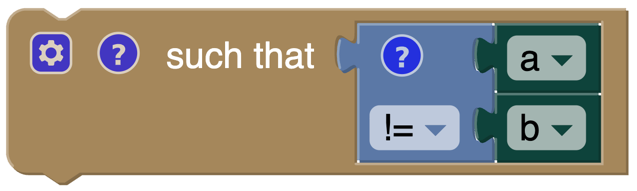
Which would produce the following Essence Output:
such that a != b
Dominance Relation
Identifies when one solution is guaranteed to be at least as good as another.
Example
Say we have 2 assignments, A and B. If A is always at least as good as B, then A dominates B and B can be ignored.
Rules
Dominance relations must have the following properties:
- Transitive: If A dominates B, and B dominates C, then A dominates C.
- Irreflexive: Nothing can dominate itself.
Domain
This section contains blocks that are used to create domains.
Currently, we support integer, boolean and matrix domains.
Domain Expression
Defines the domain.
The domains we currently support are:
- boolean
- integer
- matrix
For example, it can be used like this:
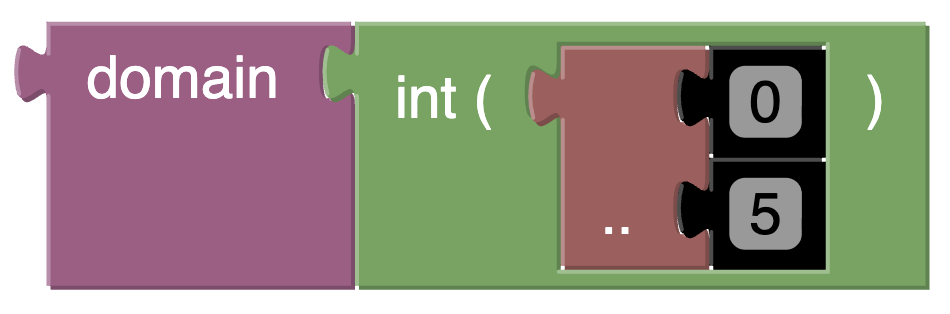
Which would produce the following Essence Output:
domain int ( 0 .. 5 )
For more information about domains in essence, see this.
Boolean domain
This domain has two values: false and true. The boolean domain is ordered with false preceding true.
Integer Domain
Defines the values an integer variable can take.
The Integer Domain can either define a single integer or a list of sequential integers with a given lower and upper bound. The bounds can be omitted to create an open range, but note that using open ranges inside an integer domain declaration creates an infinite domain. Values in an integer domain should be in the range -262+1 to 262-1 as values outside this range may trigger errors in Savile Row or Minion, and lead to Conjure unexpectedly but silently deducing unsatisfiability. Intermediate values in an integer expression must also be inside this range.
For example, it can be used like this:
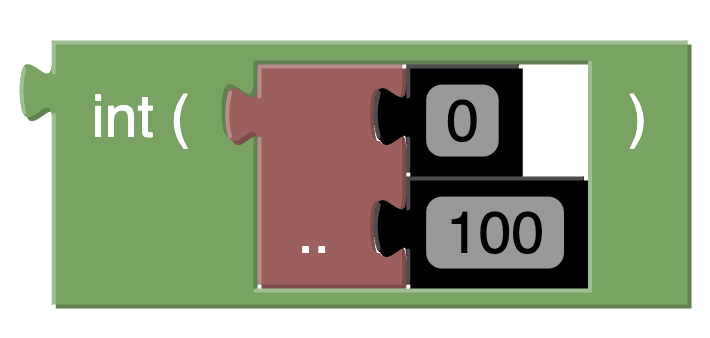
Which would produce the following Essence Output:
int ( 0 .. 100 )
Integer Expression
Defines a singular value which an integer variable can take.
Matrix
An example of a domain constructor. The matrix block takes a list of domains for its indices and a domain for the entries of the matrix. Matrices can be of arbitrary dimensionality (greater than 0).
In Conjure Blocks, a matrix can be indexed only by integer or Boolean.
See here for further information surrounding matrix domains.
Expression
This section contains information about blocks that can be used to create boolean and arithmetic expressions.
Constants
Represents constant values. For instance: integers and boolean values.
True
Represents the boolean ‘true’ state.
False
Represents the boolean ‘false’ state.
Arithmetic
This section defines blocks that are only used for arithmetic expressions.
Arithmetic Expression
Selects the operator for an arithmetic expression. Can be extended for longer operations.
There are 7 arithmetic operators available: +, -, * /, %, ** and =.

and would produce the following Essence Output:
0 + 2 - 1 ** 5
See here for further information surrounding arithmetic operators.
Absolute Value
When x is an integer, |x| denotes the absolute value of x. The relationship
(2*toInt(x >= 0) - 1)*x = |x|
holds for all integers x such that |x| <= 2**62-2. Integers outside this range may be flagged as an error by Savile Row and/or Minion.
Negative Expression
Converts an integer to be negative.
Boolean
This section defines blocks that are only used for boolean expressions.
Comparison
Used to compare two expressions. Returns a binary result.
For example, it can be used like this:
The statement x is not equal to y would be represented in Conjure Blocks as follows:
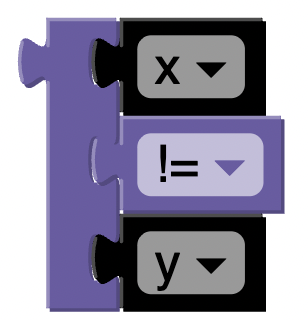
and would produce the following Essence Output:
x != y
See here for information about the comparison operators conjure uses.
Not Expression
This is a logical operation applied to a Boolean expression. Using this block inverts the truth value. (i.e. a true statement becomes false, and vice versa).
For example, if we wanted to create the statement:
not (x and y)
We could use the following blocks:
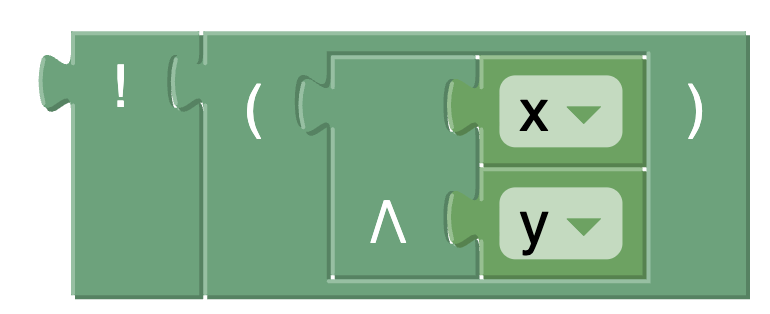
Which would produce the following Essence Output:
! ( x /\ y )
MISC
This section is for expression blocks that do not fit cleanly into arithmetic or boolean.
Bracket Expression
Used to group a collection of subexpressions.
Quantifier Expression
Iterates over the given domains to find an instance whose conditions are met.
Multiple functions are available for this block:
existsforAllsumminmaxandor
For example, it can be used like this:
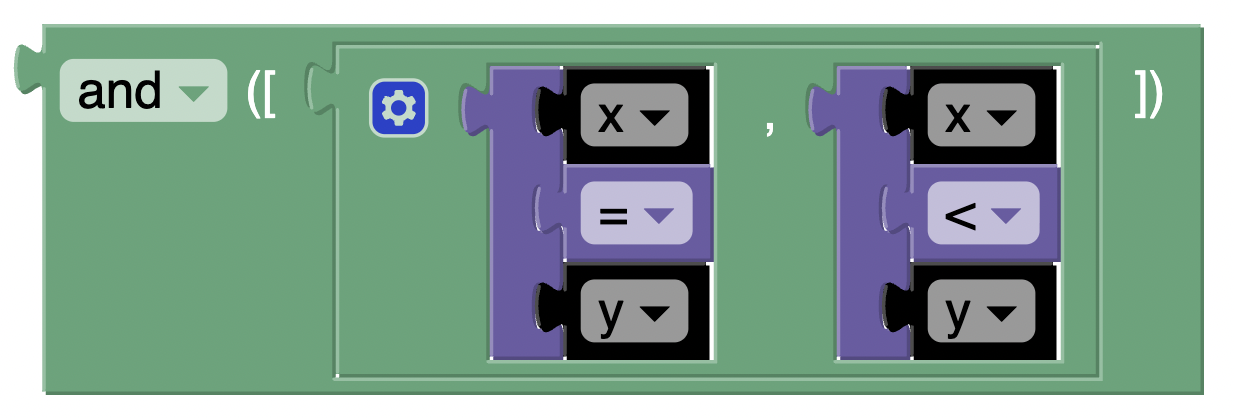
Which would produce the following Essence Output:
exists x : int ( -1 .. 13 ) . ( ( x > y ) )
Expression List
Stores a list of expressions.
Flatten
A type of matrix operator.
The flatten block takes a singular argument and returns a list containing the entries of a matrix with any number of dimensions, listed in the lexicographic order of the tuples of indices specifying each entry.
Currently Conjure Blocks does not support two arguments.
From Solution
Uses the solution that was previously found for a variable.
toInt Expression
Takes a boolean expression x and converts to an integer 0 or 1
allDiff
A type of matrix operator.
Used to test if all entries in a list are different. Returns an appropriate boolean value.
Matrix Accessor
This block is used to access elements in a matrix.
For instance, lets say you want to access the first elements of a matrix, A, you could do the following:

To access more elements in the matrix, you can extend the matrix using the cog.
Variables
This section contains information about variable blocks. Conjure blocks supports the creation of boolean and int domain variables. These variables are vital parts of constraint programming.
Variable List
Stores a collection of variables.